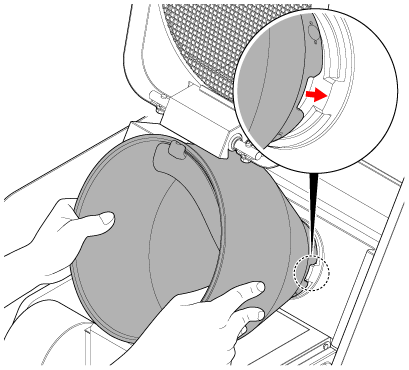
How to Remove and Attach the Pot

The pot is attached with a magnet. It is attached with a strong magnetic force, so when attaching and removing it, be careful not to pinch your fingers or hand.
- Keep magnetically sensitive items (cash cards, commuter passes, memory cards, watches, etc.) away from the IH heating unit area, pot, and spatula. Exposure to the magnet may erase stored data and render such items unusable.
- Make sure that the pot is not heated before proceeding. There is a risk of burns.
- The pot is heavy, so handle with care to avoid dropping it. Dropping it on your feet or other body parts may cause injury.
- Check that the pot is sufficiently cool before proceeding with the work. There is a risk of burns.
Always use the dedicated lever tool when removing the pot.
Failure to do so may cause an injury.
How to Remove the Pot
-
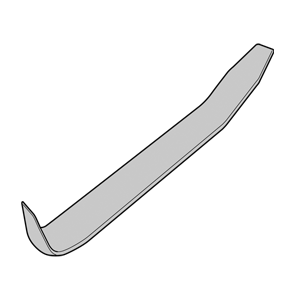
Prepare the dedicated lever tool (packaged separately).
-
Rotate the pot to position A as shown in the figure.
Indicator Description A Position it so that the dent faces directly to the side. 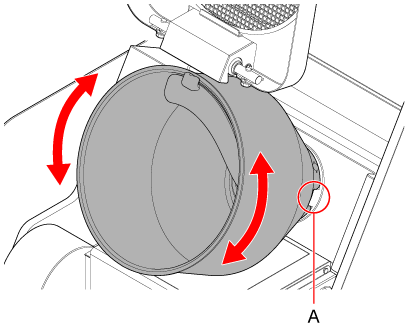
-
While holding the pot firmly, tilt it to the left.
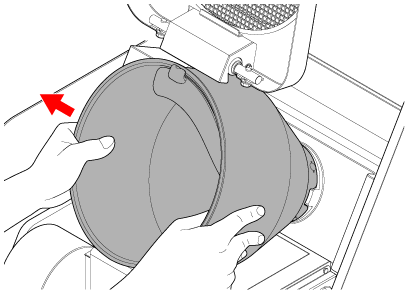

- Do not hold the base of the pot. There is a risk of pinching your fingers.
- Hold the edge of the pot as shown in the figure.
-
While tilting the pot to the left, insert the dedicated lever tool about 1 cm into the gap on the right.
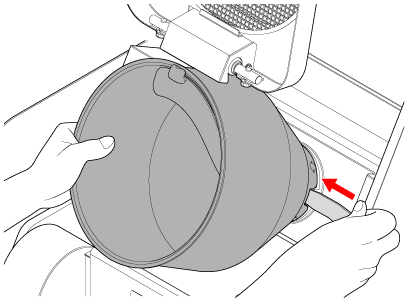
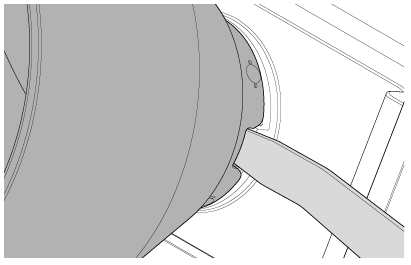
-
With the dedicated lever tool inserted, tilt the pot to the right and remove it.
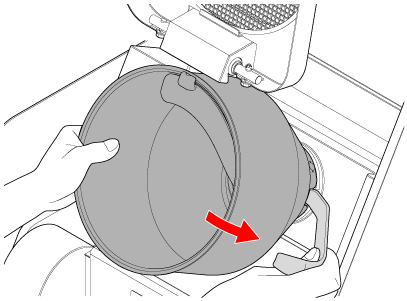
NOTICE
Do not hit the pot hard against the white plate.
Doing so may damage the plate.
How to Attach the Pot
-
Hold the pot with both hands, align its orientation, and attach it with the magnet.