Overall Device
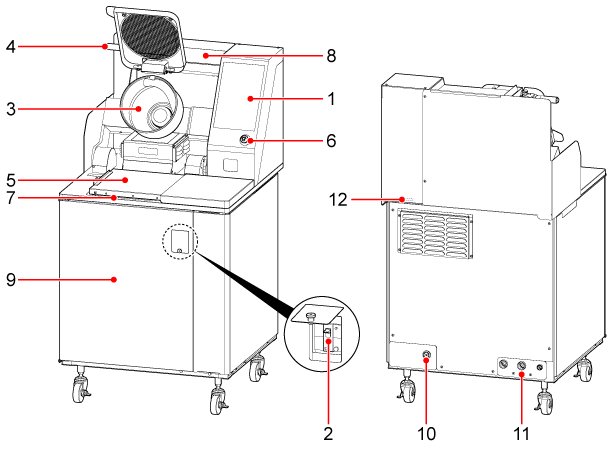
| No. | Name | Function |
|---|---|---|
| 1 | Touch panel | Used to operate this device. |
| 2 | Power breaker |
Turns the power on and off. The power breaker is located inside the cover. |
| 3 | Pot and spatula | Used for cooking. |
| 4 | Handle | Used to tilt the pot forward or return it to its original position. |
| 5 | Sink shutter |
When cooking, close the shutter to place dishes on it. When washing, open the shutter to place the pot in the sink. |
| 6 | Emergency stop switch | Used to perform or release an emergency stop of the device. |
| 7 | Sink | Used to wash the pot. |
| 8 | Seasoning holder | Used to hold various seasonings. |
| 9 | Cover | The front cover is designed to be opened and closed using a dedicated tool only during maintenance, inspection, or long-term storage. It is not intended to be opened or closed during normal operation. Never force the cover open, as this may cause damage or injury. |
| 10 | Power supply | The power cable is connected to this port. |
| 11 | Inlet/outlet | Used to supply and drain water. |
| 12 | LAN terminal | The LAN cable is connected to this terminal. |